Reading Comfort
Are Kindle cases worth it?
A case makes a light device heavier and a thin one thicker, and for some readers that is the wrong trade. Here is when it is worth it, when it is not, and what to buy instead.
By Scooter M. · Published · Last updated
How we are paid: the buy links on this page are affiliate links. If you buy through one, Amazon pays us a commission at no extra cost to you. It does not change what we rank or what we tell you to skip — the full disclosure is here.
| # | Gift | Fits | Best for | Score | Price |
|---|---|---|---|---|---|
| 1 | 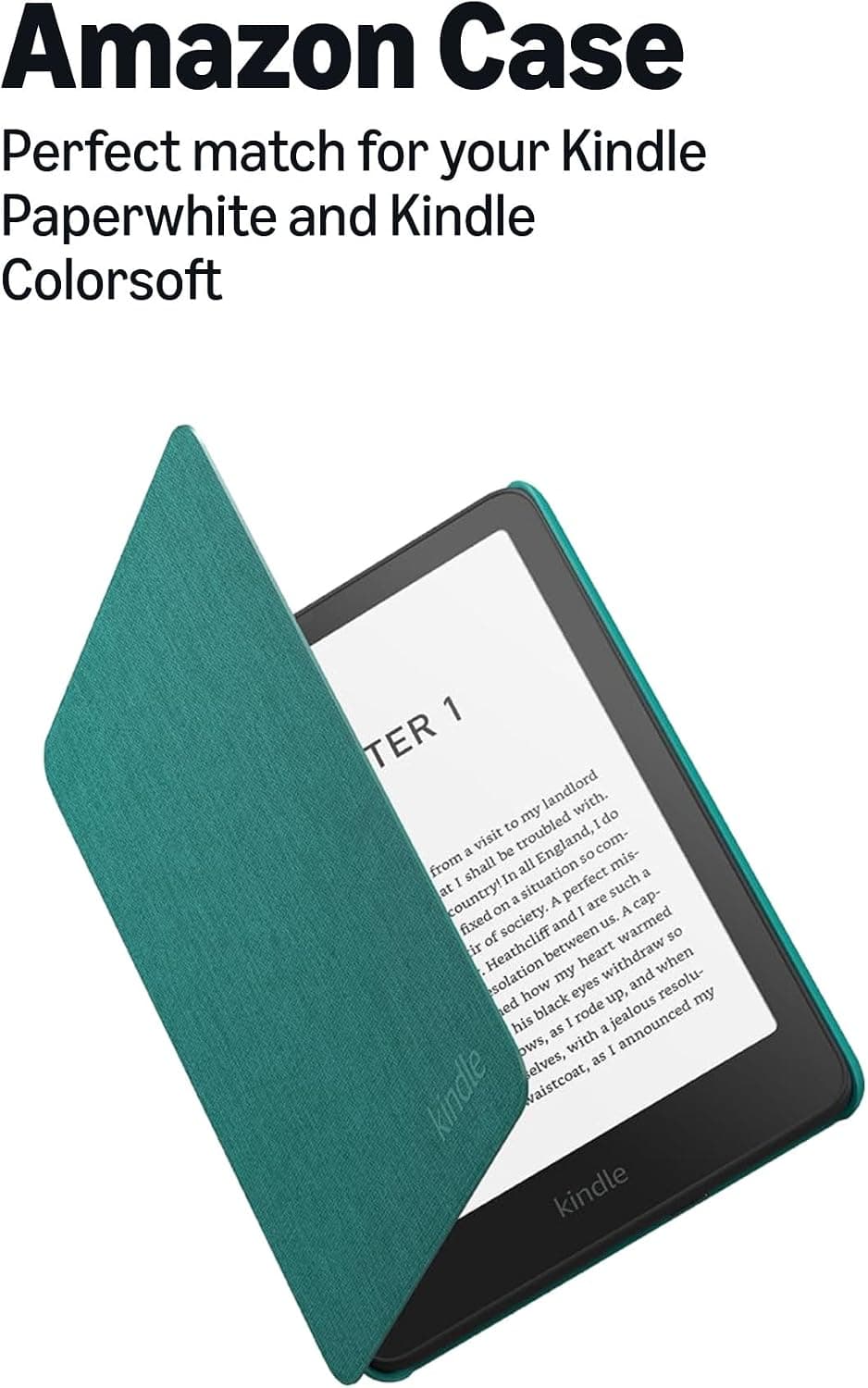 Amazon Kindle Paperwhite Fabric Case The first-party case, made from 100% recycled polyester, and the only one where compatibility is not something you have to verify yourself. | Paperwhite & Colorsoft, 2024 release | Not getting the fit wrong | 8.0 | Check price |
| 2 | 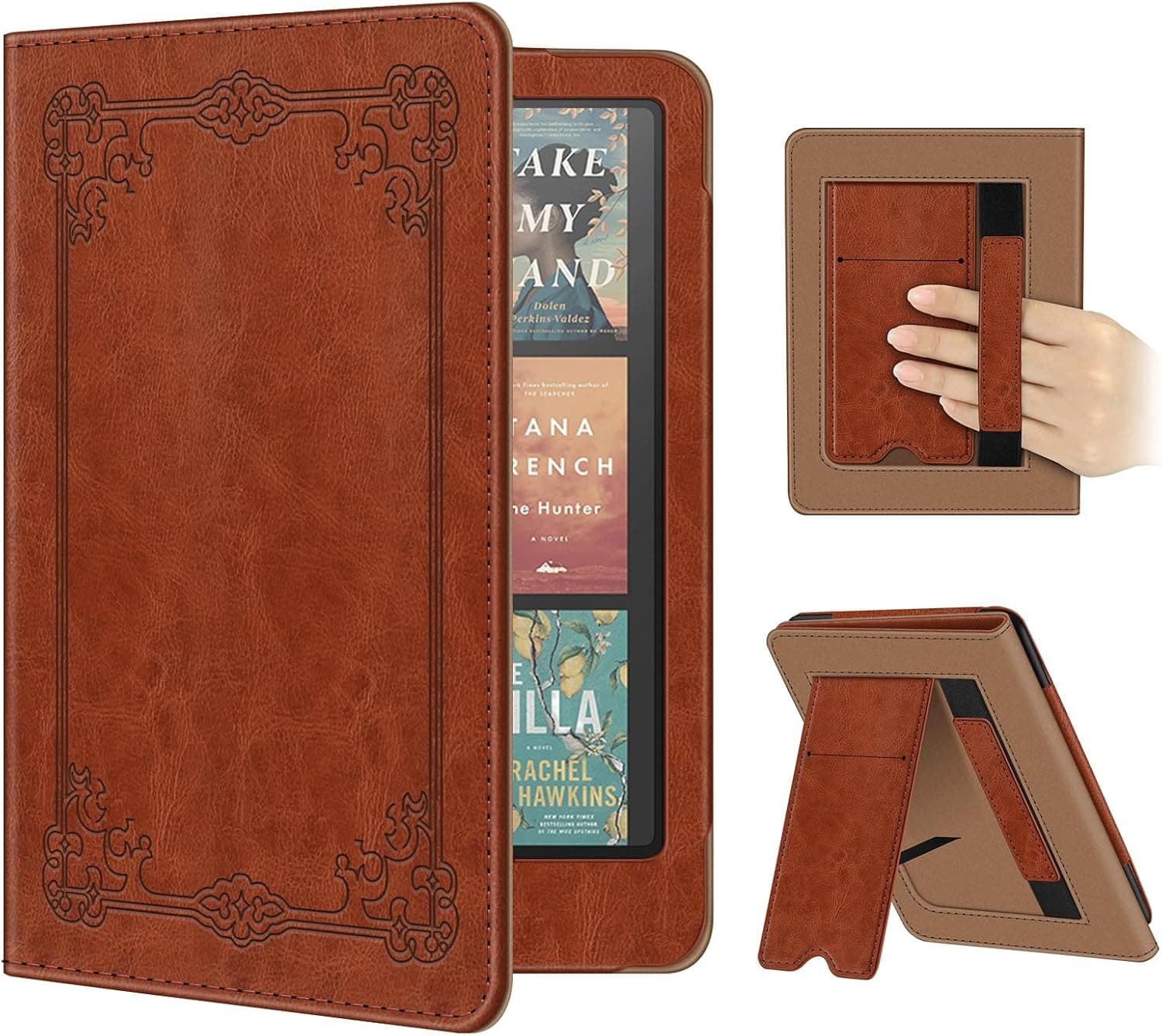 Fintie Kindle Paperwhite Case Synthetic leather with a fold-out stand, a hand strap and auto sleep-wake, covering both the 11th and 12th generation Paperwhite. | Paperwhite 11th & 12th gen, Colorsoft | Hands-free on a table | 7.8 | Check price |
| 3 | 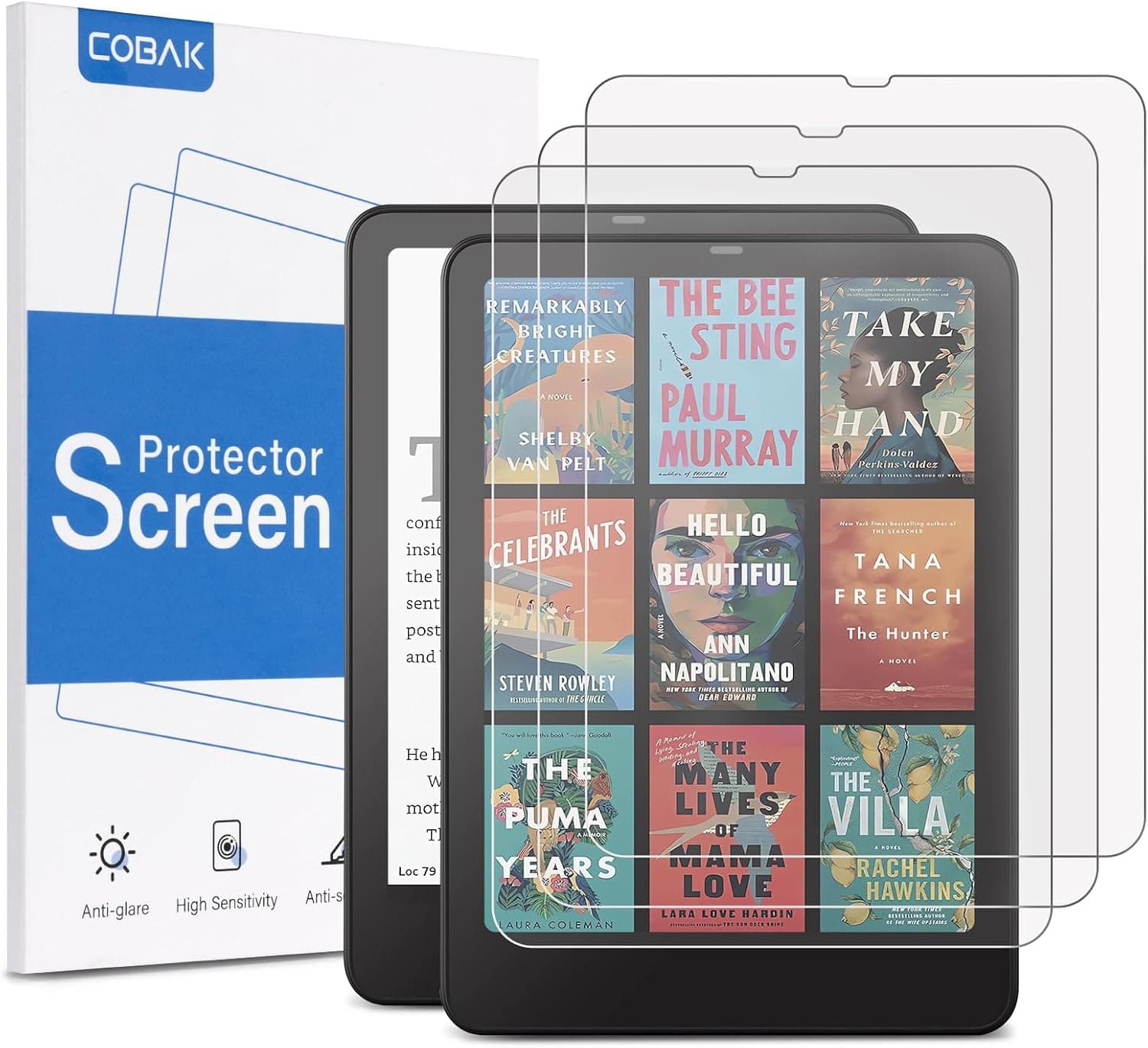 CoBak Kindle Screen Protector, 3-Pack Three anti-glare PET films with the application kit included — a small, cheap, genuinely useful thing for a specific Kindle. | Paperwhite 12th gen (2024), Colorsoft | A stocking-filler that gets used | 6.4 | Check price |
| 4 | 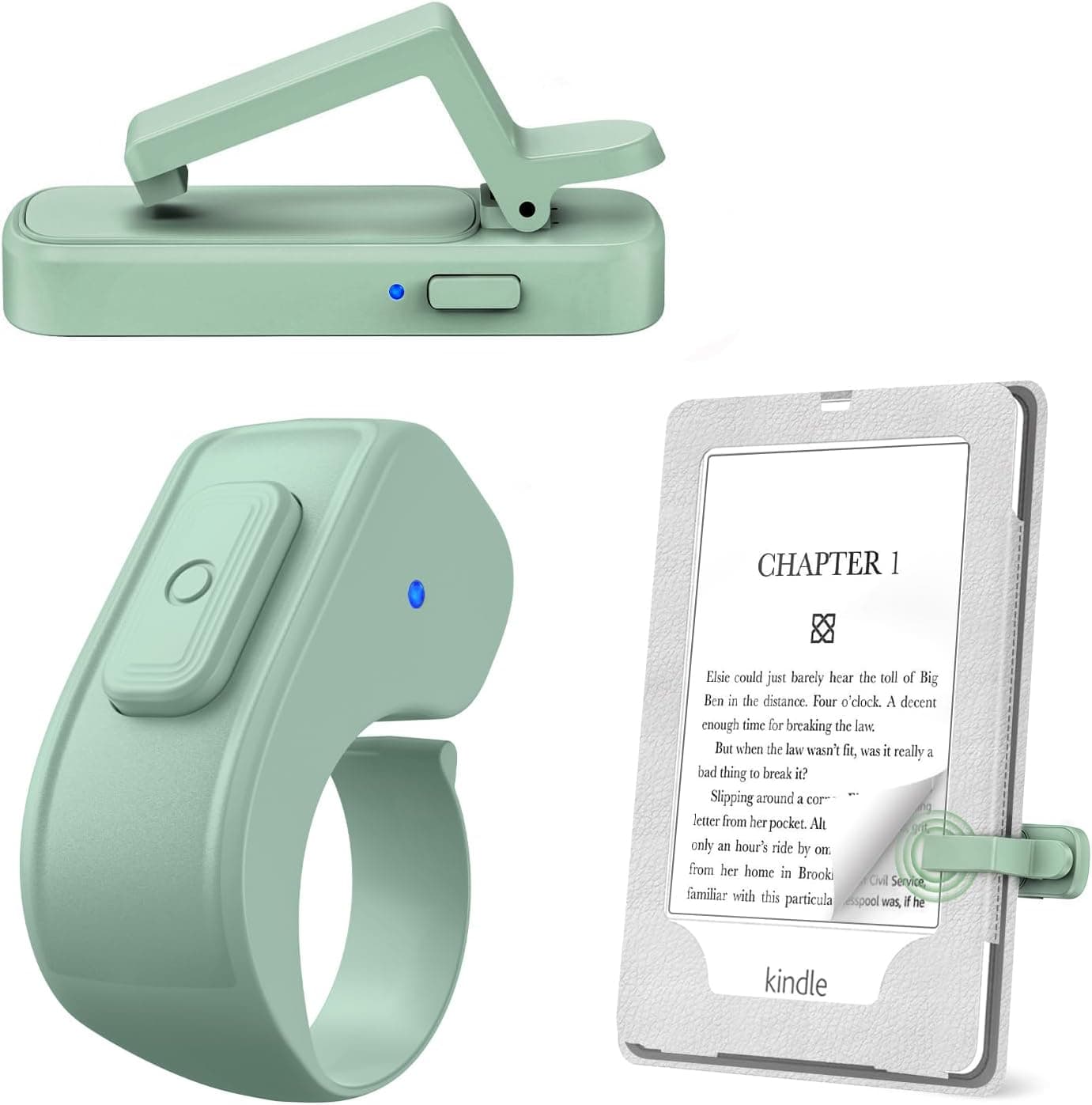 JIMZOO Page Turner Ring A radio-frequency ring that clips a sensor to the screen — no Bluetooth pairing, and it works with almost any e-reader or tablet. | Most capacitive-screen e-readers | Turning pages without moving | 6.7 | Check price |
| 5 | 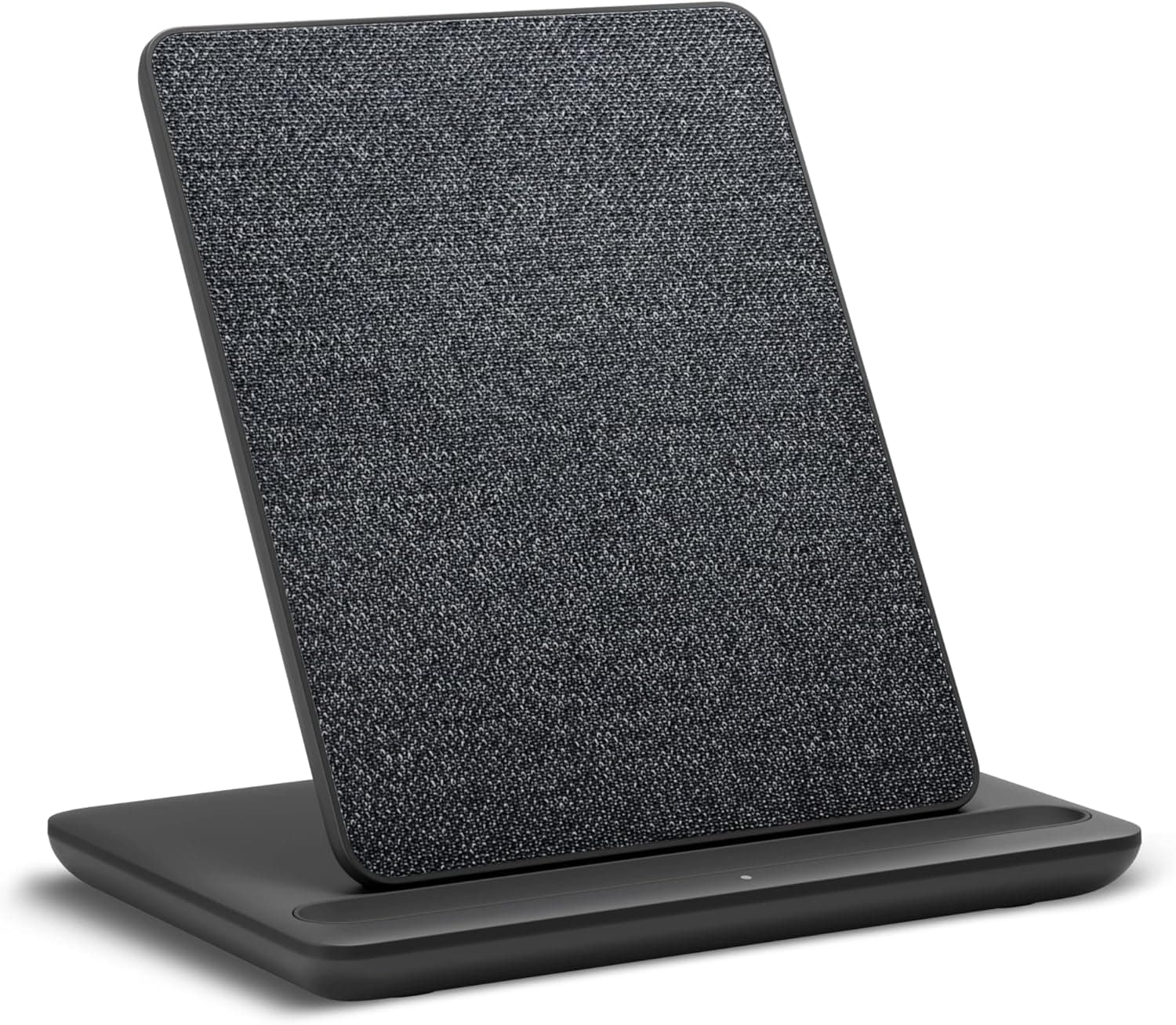 Made for Amazon Wireless Charging Dock The only Kindle accessory here with a published charge time and a published case-thickness limit — and it fits Signature Editions only. | Signature Editions only | A nightstand that stays tidy | 6.7 | Check price |
This is the pre-purchase doubt everyone has, and it is a reasonable one. Amazon spent fifteen years making the Paperwhite thin and light and the first thing most people do is wrap it in something. Whether that is sensible depends entirely on where it goes.
How we judged this one
The question is not which case is best — it is whether to buy one. So the criteria are about the trade rather than about the product:
- What the case adds that the bare device does not have.
- What it costs you in bulk, weight and one-handed comfort.
- Whether a cheaper accessory solves the same problem better.
- Compatibility risk, which in this category is unusually high and is the reason a case is a worse gift than it looks.
The case for a case
Auto sleep-wake is the underrated one. A magnetic cover that sleeps the device on closing is not a luxury — it is the difference between a Kindle that lasts weeks and one that has quietly been awake in a bag. Both cases here publish it.
The screen is glass. E-ink is durable; the sheet over it is not especially. A Kindle loose in a bag with keys is a repair or a replacement, and neither is cheap relative to a case.
Something to hold. A bare Paperwhite is a slippery rectangle. A hand strap — the Fintie publishes one — is the single biggest comfort improvement for anybody who reads lying down or one-handed for an hour.
A stand. A fold-out kickstand turns a Kindle into a hands-free device on a kitchen counter, a desk or a gym console. That is a genuinely different way to use it.
The case against
Bulk and weight, on a device chosen for having neither. A Kindle is around seven ounces. A leather folio case is a meaningful fraction of that again, and it is the reason plenty of long-time readers go without.
One-handed reading gets worse before it gets better. A folio cover flaps unless it folds fully back, and not every case does that cleanly. The first-party fabric case publishes that it folds back for one-handed reading; check for that phrasing.
It can block the charging dock. If they own or might own a wireless charging dock, case thickness becomes a hard constraint — the dock in this guide publishes a 4 mm limit, and a rugged case exceeds it.
When the answer is no, buy this instead
For a Kindle that never leaves a nightstand, the money goes further elsewhere.
A screen protector if they read outdoors or by a window. E-ink is already matte and the glass over it is what catches reflections; a textured anti-glare film puts the matte back, at a published 97% clarity. Far cheaper than a case and it solves a problem the case does not.
A page-turner ring if they read in bed. A clip on the screen edge and a ring on your finger turn pages by radio without your hand moving — under a blanket, in a coat pocket, holding a mug. It works with most capacitive-screen e-readers rather than one exact model, which also makes it the rare Kindle accessory you can buy without knowing the generation.
A wireless charging dock if — and only if — they own a Signature Edition. Only those have the charging coil; on a standard Paperwhite a dock does nothing whatsoever.
So: worth it?
Worth it for a commuter, a traveler, or anyone who reads one-handed for long stretches. The hand strap and the sleep-wake magnet alone justify it, and the stand is a bonus.
Not worth it for a device that lives beside a bed and is read for twenty minutes before sleep. Buy the anti-glare film, or the ring, or put the money toward a clip light — which works on the paper books they also own, and which no Kindle accessory can claim.
Every pick
All of them, in full
Each write-up shows the gift-fit score broken into its five parts, the specs the seller actually publishes, and who should give it a miss.
No. 1 — Not getting the fit wrong
Amazon Kindle Paperwhite Fabric Case
The first-party case, made from 100% recycled polyester, and the only one where compatibility is not something you have to verify yourself.
| Spec disclosurecomputed | 17 / 20 |
|---|---|
| Gift readinessour call | 18 / 20 |
| Works for any readerour call | 11 / 20 |
| Materials and buildour call | 17 / 20 |
| Everyday useour call | 17 / 20 |
| Total | 80 / 100 |
| Compatible models | Kindle Paperwhite and Paperwhite Signature Edition, 2024 release only, plus Kindle Colorsoft and Colorsoft Signature Edition Seller’s listing, read 2026-09-07 |
|---|---|
| Material | Water-safe fabric, 100% recycled post-consumer polyester Seller’s listing, read 2026-09-07 |
| Auto sleep/wake | Yes — opens and closes like a book to wake or sleep the device Seller’s listing, read 2026-09-07 |
| Stand function | No stand; the cover folds back for one-handed reading Seller’s listing, read 2026-09-07 |
| Weight | Not published Not published |
| Quantity in pack | 1 Seller’s product title, read 2026-09-07 |
A Kindle case is the riskiest gift on this site, and it is worth being blunt about why. Amazon has sold Kindles under the same names for fifteen years and the dimensions change between generations. A case bought for the wrong generation does not merely fit badly — it does not fit. Before buying any case, find out which Kindle they own and what year it is from.
The first-party case is the one that removes the ambiguity. This one fits the 2024 Paperwhite and Colorsoft, it says so plainly, and if the person you are buying for bought their Kindle in the last two years it is the safe answer.
The cover stays on for charging and folds back for one-handed reading, which is the practical difference between a case somebody uses and one that ends up in a drawer.
It scores low on 'works for any reader' for the obvious reason: it works only for a Kindle owner, and only for one with a recent one. That is the score doing its job rather than a criticism of the case.
Give it if
Someone you know owns a 2024 Kindle Paperwhite or a Colorsoft. Confirm the year first.
Skip it if
You are not certain which Kindle they have. Buy a book light instead; it fits every device ever made.
No. 2 — Hands-free on a table
Fintie Kindle Paperwhite Case
Synthetic leather with a fold-out stand, a hand strap and auto sleep-wake, covering both the 11th and 12th generation Paperwhite.
| Spec disclosurecomputed | 17 / 20 |
|---|---|
| Gift readinessour call | 16 / 20 |
| Works for any readerour call | 12 / 20 |
| Materials and buildour call | 15 / 20 |
| Everyday useour call | 18 / 20 |
| Total | 78 / 100 |
| Compatible models | 7 in / 6.8 in Kindle Paperwhite and Signature Edition, 12th and 11th generation (2024 and 2021), plus Kindle Colorsoft Seller’s listing, read 2026-09-07 |
|---|---|
| Material | Synthetic leather with a non-scratch microfibre interior Seller’s listing, read 2026-09-07 |
| Auto sleep/wake | Yes, with a magnetic clasp Seller’s listing, read 2026-09-07 |
| Stand function | Foldable stand, plus a card slot and hand strap Seller’s listing, read 2026-09-07 |
| Weight | Not published Not published |
| Quantity in pack | 1 Seller’s product title, read 2026-09-07 |
Two generations of compatibility rather than one is the practical advantage over the first-party case. It covers the 2021 Paperwhite as well as the 2024, which roughly doubles the odds of getting it right when you are not certain what they own.
The fold-out stand is the reason to prefer this to a plain cover. A Kindle propped on a kitchen counter or a treadmill console is a different reading experience from one held, and a case that does it is a case that gets used all day rather than in bed.
The hand strap is the underrated part. Holding a Kindle for an hour is fine; holding one for an hour on one hand while lying down is not, and a strap makes it possible.
Still verify the generation. Two generations is better odds than one, and it is not certainty.
Give it if
A Kindle owner who reads at a table, on a counter, or at a gym.
Skip it if
You do not know their Kindle's generation. Check first, or buy something format-agnostic.
No. 3 — A stocking-filler that gets used
CoBak Kindle Screen Protector, 3-Pack
Three anti-glare PET films with the application kit included — a small, cheap, genuinely useful thing for a specific Kindle.
| Spec disclosurecomputed | 13 / 20 |
|---|---|
| Gift readinessour call | 12 / 20 |
| Works for any readerour call | 10 / 20 |
| Materials and buildour call | 14 / 20 |
| Everyday useour call | 15 / 20 |
| Total | 64 / 100 |
| Compatible models | Kindle Paperwhite 12th gen and Signature Edition 2024 (7 in), and Kindle Colorsoft Signature Edition Seller’s listing, read 2026-09-07 |
|---|---|
| Material | Finely textured anti-glare PET film, 97% clarity Seller’s listing, read 2026-09-07 |
| Auto sleep/wake | Not published Not published |
| Stand function | Cut with notches so the ambient light sensor still works Seller’s listing, read 2026-09-07 |
| Weight | Not published Not published |
| Quantity in pack | 3 protectors plus dust stickers, microfibre cloth, alcohol wipes and an application tool Seller’s listing, read 2026-09-07 |
A matte anti-glare film on an e-ink screen is a real improvement, not a marketing one: e-ink is already a matte surface and the glossy protective glass over it is what catches a window. A textured film puts the matte back.
The 97% clarity figure is worth reading as the trade-off it is. An anti-glare film scatters light slightly, so text is a hair less crisp in exchange for no reflections. On e-ink that trade is usually worth taking; on a color Colorsoft it is a closer call.
The notch for the ambient light sensor is the detail that separates a protector cut for this device from a generic one. Cover that sensor and the auto-brightness stops working, which is a genuinely annoying way to break a Kindle.
Everything needed to fit it is in the box, which for a fiddly job matters. Three films means two chances to get it wrong.
Give it if
Someone with a 2024 Paperwhite who reads outdoors or by a window.
Skip it if
Their Kindle is older than 2024. This is cut for one screen size.
No. 4 — Turning pages without moving
JIMZOO Page Turner Ring
A radio-frequency ring that clips a sensor to the screen — no Bluetooth pairing, and it works with almost any e-reader or tablet.
| Spec disclosurecomputed | 10 / 20 |
|---|---|
| Gift readinessour call | 15 / 20 |
| Works for any readerour call | 15 / 20 |
| Materials and buildour call | 12 / 20 |
| Everyday useour call | 15 / 20 |
| Total | 67 / 100 |
| Compatible models | E-readers and tablets with capacitive screens — Kindle Paperwhite, Oasis, Scribe, Voyage, Kids Edition, plus Surface, iPad and iPhone Seller’s listing, read 2026-09-07 |
|---|---|
| Material | Silicone buttons on the ring Seller’s listing, read 2026-09-07 |
| Auto sleep/wake | Not published Not published |
| Stand function | Radio-frequency, no Wi-Fi or Bluetooth pairing; a clip fits the sensor to the screen edge Seller’s listing, read 2026-09-07 |
| Weight | Not published Not published |
| Quantity in pack | Not published Not published |
This is the most interesting object in the Kindle section and the least understood. A small clip sits on the edge of the screen; a ring on your finger sends a radio signal to it; the clip taps the screen for you. No pairing, no app, no account.
The practical consequence is that pages turn without your hand leaving wherever it is — under a blanket, in a coat pocket, holding a cup. It is also why it works with such a wide range of devices: it is not talking to the device at all, it is touching it.
Radio frequency rather than Bluetooth is the design decision that makes it work on a Kindle in the first place. Kindles do not pair with generic Bluetooth remotes; a physical clip that taps the glass sidesteps the question entirely.
Three of six checklist items published, and no battery life anywhere. For a ring with a battery in it, that is the number you would most want.
Give it if
Anyone who reads on a screen with cold hands, one hand, or under a duvet.
Skip it if
They read paper. It taps a screen; there is nothing for it to do on a hardback.
No. 5 — A nightstand that stays tidy
Made for Amazon Wireless Charging Dock
The only Kindle accessory here with a published charge time and a published case-thickness limit — and it fits Signature Editions only.
| Spec disclosurecomputed | 10 / 20 |
|---|---|
| Gift readinessour call | 17 / 20 |
| Works for any readerour call | 8 / 20 |
| Materials and buildour call | 17 / 20 |
| Everyday useour call | 15 / 20 |
| Total | 67 / 100 |
| Compatible models | Kindle Paperwhite Signature Editions (2022 and 2024) and Kindle Colorsoft Signature Edition only Seller’s listing, read 2026-09-07 |
|---|---|
| Material | Not published Not published |
| Auto sleep/wake | Not published Not published |
| Stand function | Portrait dock; charges through a case up to 4 mm thick; 7.5 W, to 100% in about 2.5 hrs Seller’s listing, read 2026-09-07 |
| Weight | Not published Not published |
| Quantity in pack | Dock, power supply and quick start guide Seller’s listing, read 2026-09-07 |
Read the compatibility line twice. This works only with Signature Edition Kindles, because only the Signature Editions have wireless charging coils in them. A standard Paperwhite will sit on this dock and do nothing at all. It is the narrowest fit of anything on this site.
If they do have one, it is a genuinely good object: the Kindle lives upright on the nightstand instead of face-down beside a cable, and it charges whenever it is put down. The LED that blinks when the alignment is wrong is a small, sensible touch.
The 4 mm case-thickness limit is the spec most docks of this kind decline to publish, and it is the one that decides whether it works with the case they already own. Most fabric and leather Kindle cases are under 4 mm; a rugged one is not.
Two and a half hours at 7.5 W is slower than the cable and that is not the point. Nobody charging a Kindle is in a hurry — an e-reader lasts weeks.
Give it if
Someone with a Kindle Paperwhite Signature Edition or a Colorsoft Signature Edition. Nobody else.
Skip it if
You are not completely certain it is a Signature Edition. On a standard Paperwhite this does nothing whatsoever.
Answers
Questions people actually ask
Are Kindle cases worth it?
Yes if the Kindle leaves the house — auto sleep-wake, a protected screen and a hand strap are real improvements for a commuter or traveler. No if it lives on a nightstand: a case roughly doubles the thickness of a device chosen for being thin, and a screen protector or a page-turner ring is a better use of the money.
Does a Kindle need a case to protect the screen?
Not in normal use — e-ink is durable and the device is well built. The risk is a Kindle loose in a bag with keys or a laptop, which is exactly the situation a case is for. If it never travels, an anti-glare screen protector addresses the more likely everyday complaint, which is reflections rather than scratches.
What is the downside of a Kindle case?
Bulk and weight on a device chosen for having neither, and one-handed reading gets worse unless the cover folds fully back — check for that phrasing on the listing. If the reader owns or might own a wireless charging dock, thickness becomes a hard limit too: the dock in this guide publishes a 4 mm maximum.
What should I buy instead of a Kindle case?
An anti-glare screen protector if they read outdoors or near a window, or a page-turner ring if they read in bed — a clip on the screen edge and a ring on the finger turn pages by radio without the hand moving. The ring also works with most e-readers rather than one exact generation, so you can buy it without knowing which Kindle they own.
Do Kindle cases fit all Kindle models?
No, and the failure is total rather than partial. Amazon has used the same device names for fifteen years across changing dimensions, so a case for the wrong year simply does not fit. First-party cases usually state one exact release; some third-party cases cover two adjacent generations, which improves the odds without removing the need to check.